Sunday, May 24, 2015

Author Visit With The Help Of Technology

Modern communication brought us face to face with an author of one of our favorite books. Jonathan Emmet, who resides in England, entertained our students by reading his story, "No Place Like Home."
Ms Kim and Ms Lauren's students were thrilled to hear their story being read by the author and thought carefully about what they wanted to ask him regarding the creation process.

Grade two students were able to speak to the author and ask all the questions they had regarding the inspiration behind the story, choosing perfect words, the colleagues he worked with and the colors of the illustrations.

The chat ended with the girls being inspired to read and write more, one of the goals set by our Reading and Writing Coach, Ms Jenette.

What a wonderful opportunity to have such an important visitor in our class session by the click of a button.


Tuesday, March 17, 2015

Movie Making At AAM

A group of our Grade 5 students have been working hard at collecting and editing footage for our Taaleem Movie Competition - A Day In The Life Of (Our School).
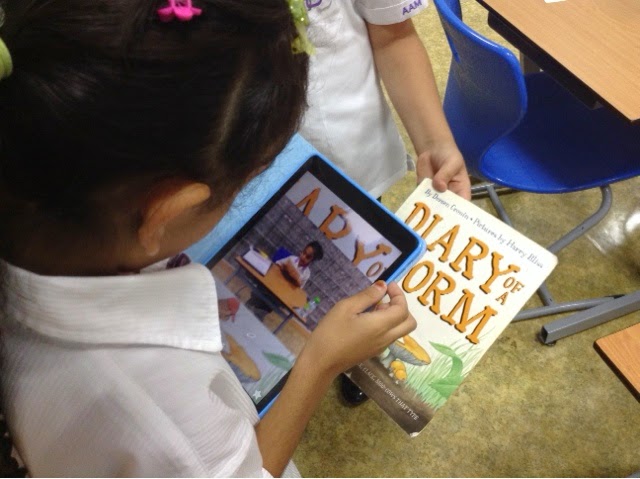
It amazed me how our young students could navigate around their iPads, using tools for interviews, film editing and working on sound.
Here is the final clip.  It was a joint effort between our Grade 5 SOAR girls, Ms. Kim and Ms. Nadene.
I believe the hardest part was limiting the running time to under 3 minutes. We look forward to hearing the results.


A DAY IN THE LIFE OF AAM from Nadene Jennings on Vimeo.

Monday, March 2, 2015

Authors Integrating Publishing Programs and apps.

Grade 4 students are working on researching inventions and will write their own book on their findings. Last year they wrote books on influential women in the Middle East. They are working with free software available online called Riot Photobooks .This year, apart from working on a new topic, they will also be using a timeline app to reflect an element of where there inventors fit in, in history.
Time Line is a free app which allows for collection of images and text in a time line format. It is a wonderful visual tool to help students understand their place in time.


Thursday, January 29, 2015

Sharing Our Success With Our Community

This year at AAM, we are looking at innovative ways to teach our students new skills and to share our work with our community. Using the Aurasma app has been one of our ideas.

Grade 3's have shared their success in landscape painting by adding an Aura to their art display.
Read More Here...
Scan the image after following steps 1-5  (It's quick and easy!)

To view our school's Auras you need to:
1. Download the Aurasma App on any device iOS or Android - It's FREE!
2. Create an account by using your email address
3. Go to the search tool (a small magnifying glass) and type in AAMTAALEEM in the search bar at the top of the page.

4. Select the channel which appears and tap on the join button on the right of the screen.
5. Now you will be able to scan any of our images within our school building that is accompanied by this sign. - or try scanning the images on any of the Augmented Reality Tabs.

David Hockney's - "A Year In Yorkshire"


Monday, January 19, 2015

Interactive Math Skills

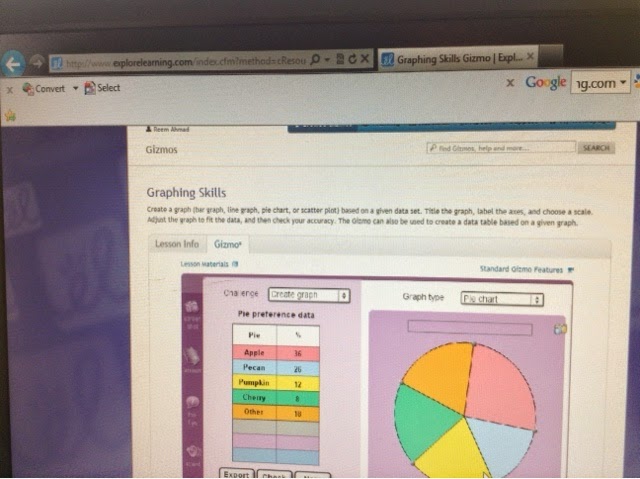
Ms. Laura's class are working on graphing and reading scales in Math. They got to work with Explore Learning.com and used their Science Gizmo labs to help them integrate Math and Science by reading and interacting with digital graphs and scales. These Grade 4's are analyzing data to adjust their graph accordingly.
This program allows students to practice a wide variety of skills including labeling, creating titles and reading graph data. Perfect practice for our upcoming MAPP testing. 

How do you help prepare your classes for upcoming tests? Which programs do you use for reflection? Leave your comments here.

Kindergarten Students Tell It Like It Is


Our kindergarten students have been analyzing books to see what they entail. These students have shared their thoughts with the community via Aurasma, an orgmented reality app.
Hear and see students talking about what they can find in books, watch them retelling and sharing stories with their friends. LANGUAGE IN ACTION!


Join our channel at AAMTAALEEM once you have created your account in Aurasma. The app is free and available to IOS and Android devices. You have to scan the picture on the wall in school to see the videos of our students' discussions come alive. So come and visit our inspiring Kindergarten corridor.

Sunday, January 18, 2015

Working On Future Careers in Language Arts

Ms. Sandi and her Language Arts classes have been looking at interesting ways of getting people to read student writing. They explored the use of Piktochart.com, a publishing tool with a modern edge.


They published Magazine articles buzzing with information as part of their 'Gatsby' study. 

This is the outline which she posted on Edmodo for her students to access:
Gossip Magazine Assignment (Grade 11)
After reading the article and using chapters 3 and 4 as your guide, create a one-page spread of a gossip magazine (perhaps The Great Gatsby's own "Town Tattler") that shares information and rumors about Gatsby (first and foremost) and any other characters from the novel thus far. Keep your information to chapters 1-4, please. This encourages close reading and doesn't give things away for others.

Consider:
-the rumors of guests
-suspicious behavior witnessed by other characters (ie. Gatsby reaching out to the green light)
-words of characters that may be considered "suspicious" or leading
-the guest list of the party (this will require some online research and is mandatory for at least 3 guest from chapter 4)

You can have as many articles as you want on the page, and you can include quick sketches/images if you choose. Include the page numbers of any quotations or paraphrasing that you may use.

Criteria:
·         At least one well-developed article that explores the "world of Gatsby" (2)
·         Carefully edited for grammar, spelling (2)
·         Stories are directly connected to details from chapters 1-4--only (2)
·         Lay-out like a newspaper/magazine with headings, date, page title, etc (1)
·         At least 3 guests have been researched and their background briefly mentioned (and that this mention indicates something about Gatsby's parties) (3)

 You may use piktochart.com or Microsoft Office to create your page(s).

Students were able to share their work with others by emailing a link or by posting it on their Edmodo page.

Thursday, January 15, 2015

Organizing Our Thoughts For Effective Writing


Ms. Heather has been facilitating learning and organizing of thoughts with the use of Popplet in her Grade 4 Language class.  The girls recapped the ideas of writing an descriptive, opinion essay and systematically organized their thoughts in Popplet as a whole class. They then transferred their learning by planning individually on their own iPads to create their own outlines for their essays.


Wednesday, January 14, 2015

Movie Making - Looking Back At The Past

Ms. Cheryl and Ms. Maria's Grade 3 classes are sharing knowledge of Dubai, "Then and Now". Some of their students created movies to show their interaction with the city and their understanding of the past, through visuals and interviews with family members.  
Click to Watch a Sample Video Made by Maryam
She was able to share her movie at our UAE National Day Celebrations in December.
Their classrooms have some wonderful displays of posters depicting the city in times gone by.

Tuesday, January 13, 2015

Develop Mental Math Super Powers

Today we celebrated our annual "Math Tea" afternoon where parents are invited to visit classrooms and see how students learn math through games and other classroom activities.
I came across Grade 3 students who were working away at improving their mental math ability through the regular use of app challenges.


Follow this link to a blog of Teachers' favorite math development apps.

and if you would like to brush up on your times tables, here is one of our favorite apps to try:
Times Table Lab.

Mathtopia - seriously addictive mental math fun!


Tuesday, January 6, 2015

Learning With Technology - And From Each Other

Grade 6 students worked on taking and creating tests in Quizlet today.  It was very easy for them to navigate and find out how to use the given tools.  Within minutes they had decided to create tests for their "word study" for an upcoming test this week and for a Science unit (atmosphere topic).

This is what one of the students had to say about it...

"Today we visited a new website in class.  In the website we saw many questions. We could take tests of things we learned in class. I think it would be a good idea to learn from it in classes." by Hoor

Sunday, December 14, 2014

Getting Reluctant Students To Talk By Using Technology

Often as a teacher it can be quite challenging to get reluctant students who are not first language English speakers to talk about their work. Here are some ideas on tech tools that can encourage them to practice speaking. Made With Voice Thread. Chatterpix is another tool to which students will want to add their voices. Chatterpix In The Classroom

Sunday, December 7, 2014

AAM JOINS THE WORLD IN- An Hour Of Coding

Our Grade 8 students will be delivering a  lesson to younger students on how to code. Ms Dareen will be introducing our students to Lightbot a program puzzle game which teaches programming logic to all from K-12. All teachers are invited to sign up for classes on Wednesday when our students will be taking part in "Hour Of Code".


available on the iTunes app store and Google App store
Cargobot is another programming app which teaches fun coding skills.

This is what the write up on itunes has to say about the hour of coding initiative.

"Lightbot One Hour Coding is created specifically for The 'Hour of Code', a nationwide initiative by Computer Science Education Week [csedweek.org] and Code.org [code.org] to introduce millions of students to one hour of computer science and computer programming."


Saturday, November 29, 2014

Authors Sharing Their Work In Attention Grabbing Ways

MsTracy's Grade 5 students wrote their own exciting stories and illustrated their cover pages to match. They wanted to share their favorite parts of their stories with our school community so they filmed themselves reading their favorite parts and then turned it into an Aura by using Aurasma, an orgmented reality app. 
Parents were very interested in how it worked and enjoyed listening to student readings during our parent-teacher conference evening. 


Tuesday, November 25, 2014

Technology - Advancing How We Learn Science At School


Our secondary students explored our new measuring and data collection tools in the science lab this week under the guidance of Ms. Nora. They were excited to implement the modern technology which enhances data collection of the relationship between speed and distance. 

Monday, November 3, 2014

Who Ever Enjoyed Learning Grammar?

Grade 8 students actually have fun learning grammar, get frustrated and "Want to get it right!"
They use NOREDINK to practice grammar skills at levels which meet their needs. The program automatically adjusts and aims questions to ensure student learning takes place as it assesses online. 
These Grade 8's are learning at a faster pace than before.


Planning with Technology

Grade 5 learners have been organizing their thoughts and creative ideas with Popplet.
They are planning a painting which reflects moods and emotions. Their use of technology helps them systematically organize their thoughts and research.


Monday, October 27, 2014

Differentiated Learning In Math

Ms Jennifer's class has been improving their math skills by logging into Front Row for one of their math lessons per week.  I was amazed to see the various levels at which students were learning and the support offered by the program if a student was stuck on a problem. As I moved around the classroom students were happy to explain their methodology, or ask me topic related questions. Here are some of the sample questions which I came across with different students. 

Students were working at their own levels on work which was aimed specifically at meeting their own needs. The program adapts the level of difficulty to ensure that learning takes places. 


Technology In Kindergarten

Have you ever wondered what Kindergarten students are learning and working with these days? I had a little look at what was available in the Kindergarten classrooms and found evidence that students do receive exposure to various technologies to assist their inquiry and learning. Here are just a few examples.

Augmented Reality - Innovative Ways Of Sharing Our Learning

Ms Heather's Grade 4 students have been working on creating Book Reviews in their Writer's Workshops - Book Buzz. They spent time preparing their written piece and conferencing with their peers and teachers on whether they were on track for success.
Their integrated technology task was to learn how to create an Aura by using the app Aurasma.

Grade 4 students are working on a clip which shows the progression of their task along with student samples of their work.  Watch this space!
Join our Aurasma channel by searching in the Aurasma app for AAMTAALEEM.